


Google One
4.144.20K Reviews
App Specs
- Version
- 1.322.964892407
- Updated On
- License
- Free
- Downloads
- 1,000,000,000+
- Developer
- Google LLC
- Categories
- Productivity
- Platform
- Android, iOS
Screenshots
 Analysis by AppCompare
When phone backups stall or a warning says storage is nearly full, the problem is rarely just one file. Photos, email attachments, and documents can all draw on the same Google account space, so figuring out what to delete takes time. I see Google One as most useful when it makes that routine easier: it brings storage use, backup controls, and cleanup suggestions into one place instead of leaving you to hunt through separate apps.
When storage becomes a recurring chore
Google One is a free productivity app from Google LLC, built around managing cloud storage and phone backups. Its value depends on how much you already use Gmail, Google Drive, and Google Photos. If those services hold years of mail, files, and pictures, a single storage overview can be more practical than checking each service whenever a warning appears.
The app has an average rating of 4.1 from around 840,000 ratings, and it has been installed over a billion times. Those figures suggest that it serves a common need, but they do not guarantee that every feature suits every account or phone. I would judge it by a simpler test: does it help you avoid interruptions and make storage decisions with less guesswork?
Guides and Analysis on Google One
That question matters because cloud storage is shared across services rather than reserved for one tidy folder. A large email attachment can contribute to the same pressure as a photo library, and a backup can use space without being something you browse every day. Seeing the overall picture is useful; understanding what you can safely remove still takes a little care.
Why Google One?
Okay, so what exactly is Google One? In a nutshell, it's Google's cloud storage service. It's designed to give you more space than the basic 15GB you get with a free Google account. And let's be real, between Gmail, Google Drive, and Google Photos, that 15GB can disappear faster than your paycheck on a Friday night.
With Google One, you can choose from a variety of plans that offer more storage, starting from 100GB and going all the way up to a whopping 30TB. Yeah, that's right. 30 terabytes. Whether you're a casual user or a hardcore digital hoarder, there's a plan for you.
Features Worth Highlighting
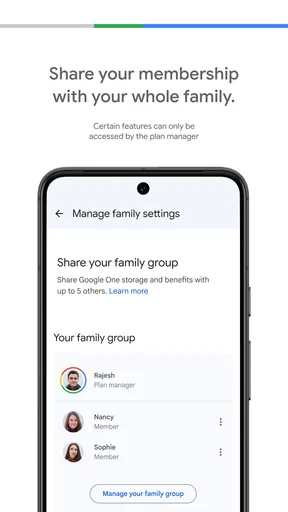
First off, sharing is caring, and Google One gets it. You can share your storage plan with up to five family members. No more fights over who used up all the space with their cat videos.
Worth Reading Before You Choose

Basketball Stars: Multiplayer Is Fast, but Can It Recover When Matches Go Wrong?

WEBTOON Turns Phone Updates Into a Better Reading Routine

Link to Windows Runs on Shared Habits, Not Social Feeds

How Alibaba.com Dominates the B2B Marketplace

Metro's Quiet Rise: Redefining Mobile Communication

Harnessing Ecosystem Power with Phone Tracker by Number
Another cool feature is the free VPN for eligible plans. With all the cyber threats out there, having a VPN is like having a digital guardian angel. It’s reassuring to know your browsing activities are private, especially when you're sipping coffee at your local café.
And let's not forget the customer support. With Google One, you get access to experts 24/7. Ever tried to troubleshoot a tech problem at 3 AM? Yeah, it's not fun. Thankfully, Google One’s got your back.
Exploring the App
The Google One app is straightforward and user-friendly. Available on both Android and iOS, it makes managing your storage a breeze. The interface is clean and intuitive, which is what you'd expect from Google.
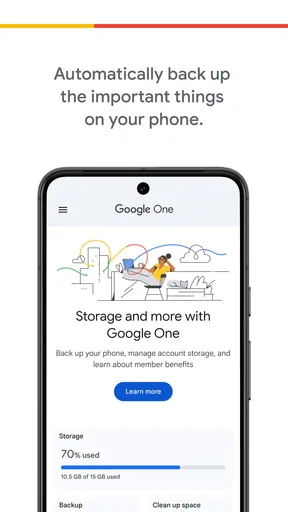
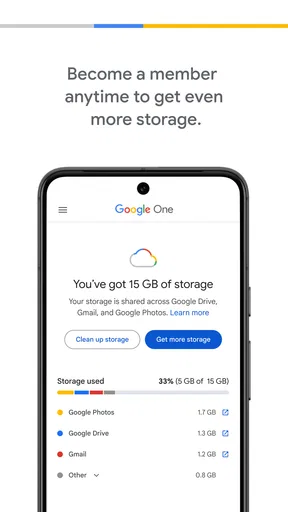
Upon opening the app, you see a dashboard showing your storage usage. It's color-coded, so you can quickly see what's eating up your space. Need to upgrade? The app lets you do it in just a few taps.
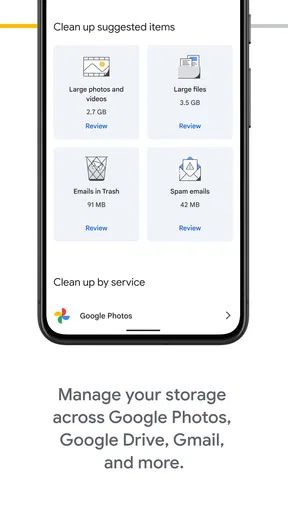
You also get suggestions on freeing up space. I found this super helpful because, let's face it, we all have files we could do without. The app even offers to clear out large email attachments or blurry photos. It's like having a personal digital organizer.
A practical setup that pays off later
I would start by checking the storage breakdown before changing anything. The useful habit is to identify which service is growing fastest, then decide whether the answer is deleting items, organizing them, or paying for more room. That prevents a common mistake: buying a larger plan when a quick cleanup would have solved the immediate problem.
For automatic phone backup, take a moment to confirm what is included and whether the account you expect is selected. A backup is only reassuring if it is attached to the account you can access later. I also recommend checking the app after setup rather than assuming that a toggle alone means everything important has finished uploading.
Cleanup suggestions are best treated as a review queue, not an instruction to delete everything offered. Large attachments may be old and disposable, but they may also contain a receipt, travel document, or work file you still need. I would open the relevant item in its original context before removing it, especially when clearing email or photo content.
Small routines that prevent bigger interruptions
A realistic example is a family trip. You take pictures throughout the day, then notice your phone is warning about space just as you want to capture an evening event. The app can help you see whether the pressure comes from backed-up photos, mail, or Drive, so you can make a more informed choice than deleting random files from the camera roll.
For someone who relies on Gmail for bills and confirmations, storage management can be a quiet but useful maintenance task. Rather than waiting until email or backups become inconvenient, I would check the dashboard occasionally and act on the largest, least valuable items first. That is more efficient than spending time removing dozens of tiny files that barely affect the total.
Family sharing can also make sense when several people already use Google services and want to draw on one shared plan. It reduces the need for each person to solve the same storage problem separately. The trade-off is that a shared pool calls for some communication: if several people are uploading large libraries, it helps to know that one person’s habits can affect the room available to everyone.
On the other hand, if you mainly store files locally, use another cloud provider, or have plenty of account space, this app may not change much about your day. It is most compelling when Google services are already part of your routine, not as a reason to move an entire digital life into a new ecosystem.
Where it saves effort—and where it does not
The strongest convenience is having a quick place to understand account-wide storage pressure. Without that overview, a person may clean up photos only to find that email attachments or Drive files are the bigger issue. The app can point your attention in a more productive direction, although deciding what is safe to remove remains your responsibility.
Compared with handling storage separately inside Gmail, Drive, and Photos, Google One is the more convenient management layer. The individual services are still better when you need to inspect a particular message, folder, or picture in detail. I would use the overview to locate the source of a problem, then use the relevant service to make careful, item-level decisions.
It also differs from a general file manager. A file manager is useful for browsing what is stored on a device; Google One is more relevant when the concern is shared account space and backup. If your main goal is sorting local downloads or moving files between folders, a dedicated file manager is the better fit.
Buying additional storage is another decision worth separating from app convenience. The app is free to install, while in-app purchases range from $0.89 to $249.99 per item. I would first look at the account’s usage and expected needs, then compare the cost of a plan with the time and hassle of repeatedly clearing space. The right choice is personal, and it is sensible to avoid paying for capacity you are unlikely to use.
The experience is not entirely frictionless. A dashboard can make storage easier to understand, but it cannot decide which old photos matter to you or whether an attachment is safe to discard. Suggestions may also feel less helpful if your storage is dominated by files you genuinely need. In that case, the practical choices are to keep managing space carefully or consider a plan with more capacity.
Who should choose it, and who can skip it
I would recommend trying it if your Android or iOS phone backs up to a Google account, you use several Google services, or storage warnings regularly interrupt tasks. It is also worth considering if you want a straightforward way to check the shared storage picture before deciding what to delete. The app is rated for Everyone, and its current version is 1.295.861827134; it requires operating system version 9 or later.
If you are already committed to another cloud service and rarely use Gmail, Drive, or Photos, adding another storage workflow may create more confusion than value. Likewise, people who prefer to keep personal files entirely offline may not benefit from a cloud-focused management app. I would not install it expecting a general-purpose organizer or a replacement for careful file management.
One question people often have is whether the app itself automatically fixes a full account. I would not treat it as a magic cleanup button: its overview and suggestions help you find possible actions, but you still need to review and choose what to remove or whether to expand storage. Another practical question is whether upgrading is necessary right away. Check what is using space first; the answer may be a targeted cleanup rather than a purchase.
For backups, the key question is whether they are useful when changing or replacing a phone. The app is designed to help manage automatic phone backup, which can reduce the work involved in keeping data backed up, but I would verify the account and backup status so you know what is covered. For shared storage, I would also make sure family members understand that they are using a common allowance rather than separate personal pools.
The Verdict
So, is Google One worth it? If you're entrenched in the Google ecosystem, then absolutely. The added storage is a no-brainer, and the extra features are just the cherry on top. Whether you need more space for your vacation photos or just want peace of mind from a VPN, Google One has you covered.
Beyond storage, the ability to share your plan with family and access to round-the-clock support make it a compelling choice. Plus, managing everything through the app is simple and efficient.
If you haven't checked it out yet, I'd recommend giving Google One a spin. You might just find it's exactly what you need to take control of your digital life. And if nothing else, it'll save you from having to delete those cat videos.
Pros
- Seamless integration with Google services.
- Affordable storage plans for various needs.
- Easy sharing with family members.
- Advanced photo editing tools included.
- Secure and automatic backups.
Cons
- Limited offline access to stored files.
- Some features need a paid plan.
- Interface can feel cluttered.
- Limited support for non-Google files.
- No free tier for additional storage.
FAQs for Google One
What is Google One and how does it differ from Google Drive?
Google One is a subscription-based service that offers expanded cloud storage across Google Drive, Gmail, and Google Photos. Unlike the free version of Google Drive, which provides 15 GB of storage, Google One plans start at 100 GB and include additional perks like family sharing, expert support, and occasional promotional offers.
How does family sharing work with Google One?
Google One allows you to share your storage plan with up to five family members. Each member gets their own private storage space, but they share the total storage limit. This feature makes managing family photos, documents, and backups simpler, all while keeping personal files separate and secure.
What benefits come with a Google One subscription?
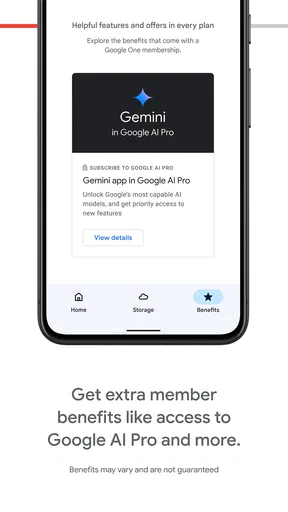
Aside from expanded storage, Google One subscribers gain access to Google experts for help with their products and services. Members also enjoy special benefits like Google Play credits, hotel discounts, and exclusive offers. These perks make Google One a comprehensive solution for those deeply embedded in the Google ecosystem.
Is my data secure with Google One?
Yes, Google One prioritizes data security with robust measures like encryption and advanced privacy settings. Google employs various security protocols to ensure your data is protected against unauthorized access. Additionally, you can manage sharing and access settings directly through your Google account.
Can I cancel or change my Google One plan anytime?
Yes, Google One offers flexibility with plan management. You can upgrade, downgrade, or cancel your subscription at any time through your Google account settings. Changes to your plan take effect immediately, allowing you to adjust your storage needs as necessary without any hassle.


